
This video explains the Search and Replace feature recently added in the translation program OmegaT.
Basics
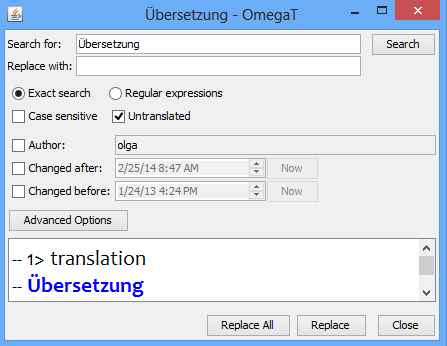
To open the Text Replace window, go to Edit → Search and Replace or press Ctrl+K. The Text Replace is quite similar to the Text Search window (Ctrl+F).
After you find matches, you have two options:
Replace All: By pressing this button and confirming the request, you have OmegaT replace all matches with the contents of the Replace with field.
Replace: Use it for manual replacement:
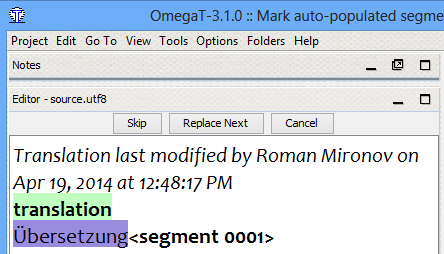
- The Editor pane gets filtered to display only the matches in the same way as pressing the Filter button does in the Text Search window. Three buttons—Skip, Replace Next, Cancel—display at the top of the Editor pane. OmegaT displays matches in dark blue.
- When you click Replace Next, OmegaT highlights the current match, and the next click replaces the match with what is in the Replace with field. Then, OmegaT moves to the next match.
- When you are done, click Cancel to remove the filter in the Editor pane.
- To return to the segment from which you started the replacements, press Ctrl+Shift+P repeatedly (Go To → Back in History).
Pre-translation
Selecting the Untranslated option makes pre-translation possible; that is, OmegaT inserts source into target for those untranslated segments that have search results before making replacements.
Final tips
For more efficient use, you can:
- run search by pressing Enter if the cursor is in the Search for field.
- run search by pressing Alt+S anywhere in the Text Replace window.
- press Ctrl+F to return to the Search for field.
Visit SourceForge for the latest version of OmegaT. For more information about mastering OmegaT, click any of the tags below.
I need some help.
How do I specify backreferences in the ‘replace with’ textbox when using regular expressions?
(E.g I’d like to replace all decimal dots within numbers with decimal commas, so I search for (\d+)\.(\d+) and now I want to have something like \1,\2 in ‘replace with’ but that does not seem to be the right syntax in OmegaT regexes).
I believe the ‘replace with’ textbox does not support regular expressions at all.
Well, it allows search with regexps, so it would be nice to allow to use backreferences in replace field too. I wish developers implemented it at some point. Thanks very much for assistance anyway!
Just for the record, in case anyone searches for this: You should use the dollar character (javascript) for back references, so $1 and $2 in the above example.
Yes! Thank you so much for sharing, Simon.